
Copy your public profile address from the Basics tab of the Profile Builder and share it anywhere: with a recruiter, in a job application, on LinkedIn or in your email signature. Your address is profiled.careers/ followed by your username. It works once your profile is published; until then, anyone who opens it gets a "not found" page. If your profile shows Published and the address still answers "not found", see Troubleshooting and first-week FAQ.
Detail
Where to find it. Open Profile in the sidebar. On the Basics tab, under your profile photo, the "Public profile URL" card shows your address. Its Edit button changes it; Why doesn’t my profile URL match my name, and can I change it? explains the rules.
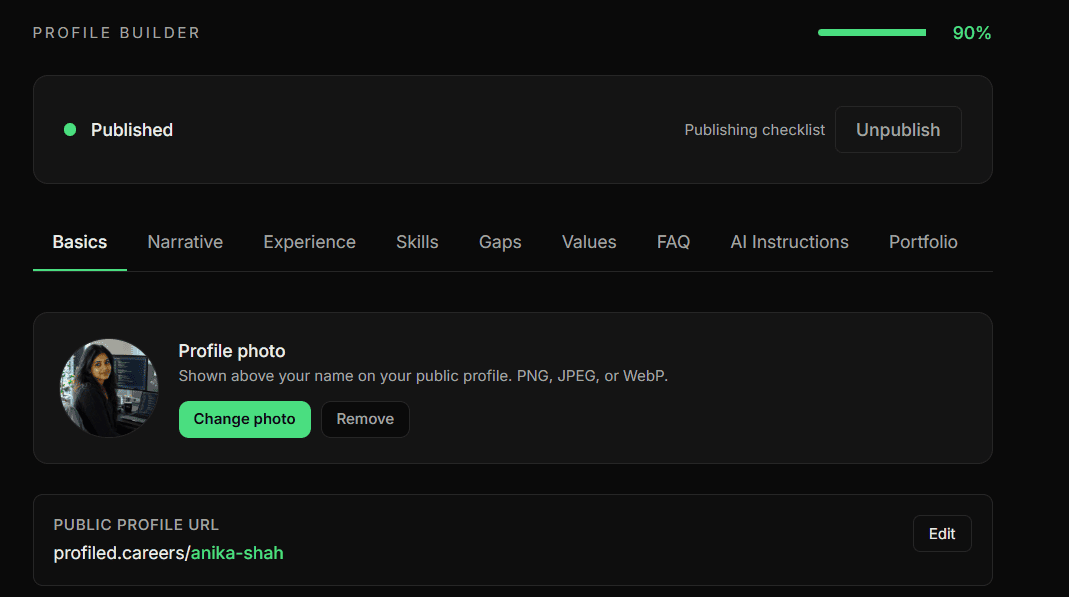
Before you publish. A draft has no public page, so a link you share early answers "not found", even for you. To see your draft, use Preview in the sidebar: a private preview that only you can open. Once you publish, that entry becomes View your profile and opens your live page in a new tab. Preview / View your profile: your profile as a visitor sees it describes both.
Where to share it. Anywhere is fine. Send it to a recruiter, add it to your LinkedIn profile and email signature, and include it in every application. Anyone with the link sees your public profile, can ask its AI questions about you, and can run an Honest Fit Assessment against a job description. Nothing you marked Private is ever shown. What exactly do visitors and recruiters see on my public profile? lists what they see.
Applying for a role. Profiled does not attach your profile when you apply, including through Opportunities. Paste your link into the application yourself, so the hiring manager can question your fit directly. Opportunities — browsing, applying, flagging has that advice under "Applying (Pro)".
Opening your own link. When you visit your live profile while signed in, a line at the top reads "You’re viewing your live profile" with a "Back to dashboard" link. Visitors don’t see it.
Related
- Why doesn’t my profile URL match my name, and can I change it?
- What exactly do visitors and recruiters see on my public profile?
- Preview / View your profile: your profile as a visitor sees it
Last verified: 2026-10-07