
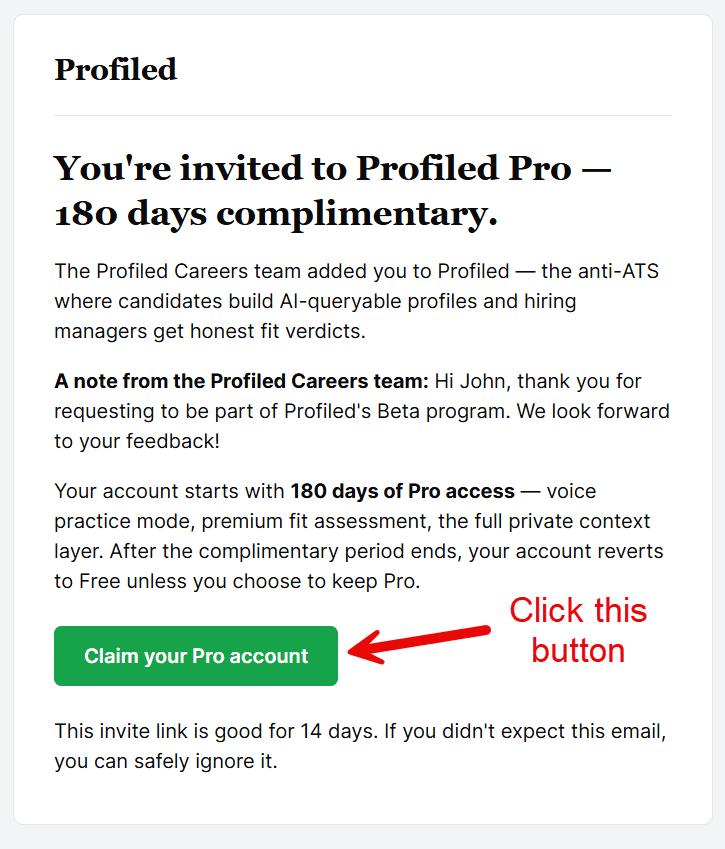
Open the invitation email and click the sign-up button (a beta invitation link is valid for 14 days; an invitation from a friend through Refer & Earn, for 90 days).
The sign-up page first asks two short questions and asks you to tick one box. Your account is locked to the invited address, so after that you only need to set a password. Submitting takes you straight to your dashboard with an empty profile ready to build.
Detail
Finding the invite. The email comes from Profiled. Check your spam folder if it is not in your inbox. If a personal welcome note arrived separately with a backup link, either link works.
If the link has lapsed. The email itself states how long its link is valid: 14 days for a beta invitation, 90 days for an invitation from a friend through Refer & Earn. Once past that, the link stops working. Ask whoever invited you to resend it, and the new email starts the clock again.
Before the form appears. The sign-up page opens with two required questions, each a drop-down list: "How did you hear about Profiled?" and "Which describes you best?". Below them is one box to tick: "I am 18 or older, and I agree to the Terms of Service and Privacy Policy." Both documents are linked from that line and open in a new tab. The box starts unticked. Until both questions are answered and the box is ticked, a line in place of the form tells you what is still missing. Unticking the box hides the form again.
Creating the account. The form is titled "Fill in missing fields". The invitation link already carries your invited email address, so the only field left is the password. Type a password; a green confirmation appears under the field once it is strong enough. Then select Continue. The form also shows a Continue with Google button, which is the only third-party sign-in Profiled offers.
Invited addresses only. Profiled runs sign-up in a restricted mode during the beta, and there is no public sign-up form: during the beta an account can only be created from an invited address. Anyone who opens the sign-up page without an invitation link is sent to the priority list page instead.
If your invite includes complimentary Pro, the invitation email states how long that period lasts. It starts when you create the account, and it does not ask for a card.
After submitting, you land on your dashboard, where the Profile Setup panel shows your first step. Your profile status is Draft and nothing is public yet. Your profile only becomes visible after you publish it. If the Terms of Service change later, your dashboard asks you to read and accept the new version before you continue.
💡Follow our step-by-step Quick-Start User Guide to learn how to set up your profile quickly and easily.
Related
- What should I do first after logging in?
- Do I need a credit card to sign up?
- How do I get an invite to the beta?
Last verified: 2026-10-21