
What this screen is
You don’t have to pay to get Pro. Refer & Earn is available on every tier: invite people who’d genuinely use Profiled, and bank months of Pro as they join and upgrade.
Open it from Refer & Earn in the dashboard menu. The item is there on Free and Pro alike, and nothing has to be switched on for your account first. Your User Dashboard at a glance: the menu, tiers, flags and banners lists every menu item and who sees it.
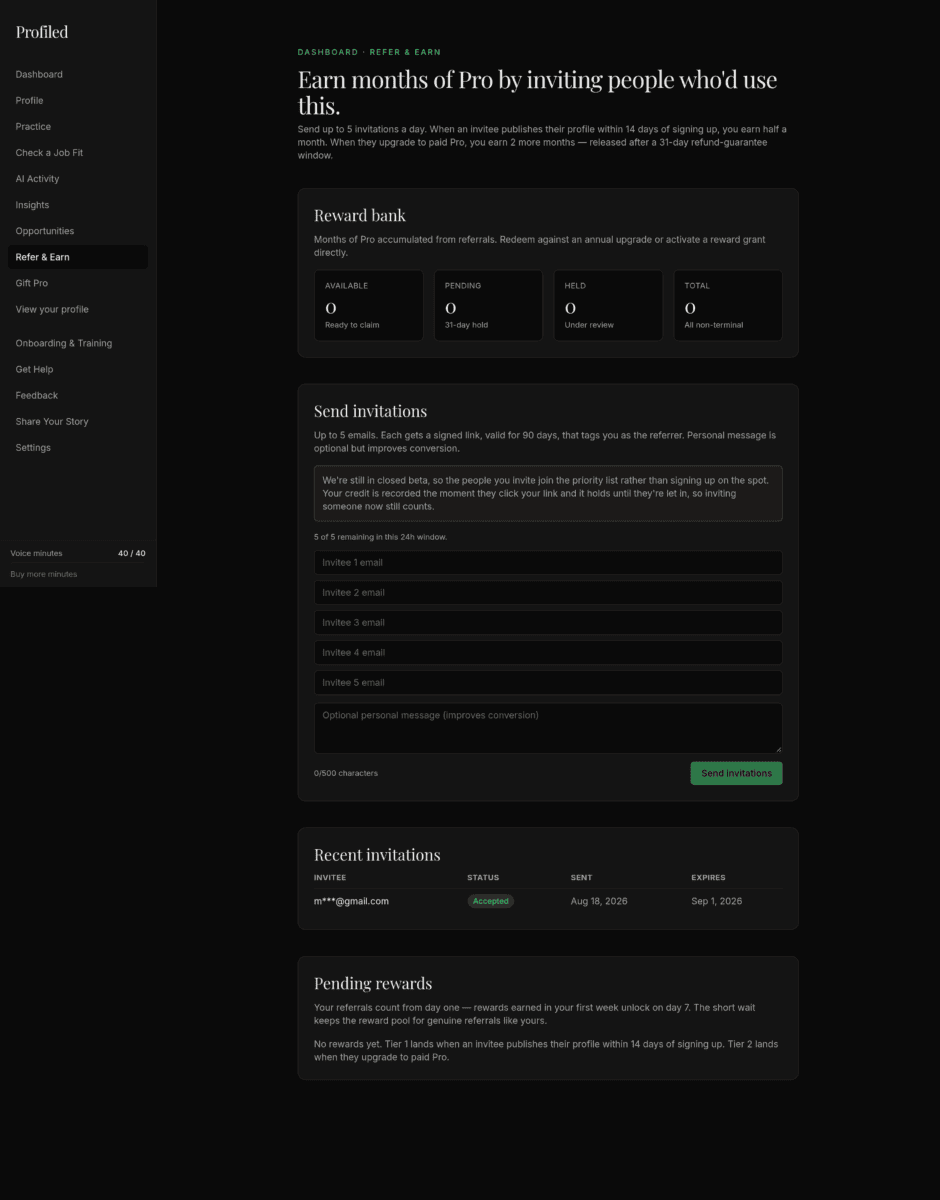
The screen’s heading reads "Earn months of Pro by inviting people who’d use this." The line under it gives the rule: "Send up to 5 invitations a day. When an invitee creates a profile, you earn half a month. When they upgrade to paid Pro, you earn 2 more months — released after a 31-day refund-guarantee window."
Two other entries go deeper than this one. How do referral rewards work — what do I earn, and when is it released? answers the reward questions one at a time. Why can’t I send referral invitations yet? covers a form that is disabled or refuses to send.
What you earn
| When your invitee… | You earn | When you can claim it |
|---|---|---|
| Publishes their profile within 14 days of signing up | Half a month of Pro | Usually within about a day of publishing |
| Upgrades to paid Pro | 2 more months | After a 31-day hold |
| Stays subscribed — at their 3 / 6 / 12-month marks | +1 / +2 / +3 months | After the next daily check |
| A Gift Pro recipient of yours pays for Pro | A gift bonus of 1 month, in place of the 2 months above | After the 31-day refund window |
The screen says "creates a profile". In practice the half month is earned when your invitee publishes their profile, and only if they do it within 14 days of signing up. When your invitee signs up, your dashboard tells you so, with the line "We’ll credit your reward bank if they publish their profile within 14 days of signing up."
The half month is added by a daily check at 03:00 UTC, and a second daily check, a few minutes later, releases rewards whose hold has ended. A half month usually shows in Available within about a day of your invitee publishing.
A gift bonus replaces the 2-month upgrade reward for that person; you don’t get both. Someone you gifted Pro to usually earns you no retention bonus.
One referral who signs up, publishes and later upgrades is worth two and a half months. Most of that comes from the upgrade, so invite people Profiled suits.
The reward bank, and what "Pending" and "Held" mean
The bank shows four balances: Available, Pending, Held, Total.

| Cell | Hint on screen | What it means |
|---|---|---|
| Available | "Ready to claim" | Months you can claim now |
| Pending | "31-day hold" | Earned, not yet claimable |
| Held | "Under review" | Paused until a condition is met or the Profiled team has looked at it |
| Total | "All non-terminal" | The three cells above added together |
- Pending — upgrade rewards are released after a 31-day hold. That’s deliberate: it’s the 30-day money-back window on a first Pro payment, plus a day. If your invitee’s payment is refunded inside the guarantee, the reward is withdrawn; once the hold passes, the months move to Available on their own. The reward is also withdrawn if your invitee’s subscription is no longer active when the hold ends. A 1-month gift bonus waits here for the same 31 days. A half-month or retention reward that is waiting for the next daily check is counted in this cell too, even though the hint says "31-day hold".
- Held (under review) — most commonly this means your own account is less than 7 days old when the reward was earned. Rewards earned in your first week wait until your account is 7 days old, and the daily check then releases them without anyone having to approve them — an anti-abuse measure, not a problem with your referral. A half month goes to Available. An upgrade reward goes to Pending for whatever is left of its 31-day hold. A reward held for any other reason waits for a review by the Profiled team — for example when the person you invited appears to be you, such as an invitation sent to a "+" variation of your own email address. While a reward is under review, your dashboard shows "A referral reward is being reviewed." If a reward is still Held more than a day after your account’s first week, contact support.
Tip: read Available, not Total. A bank showing a Total of 4.5 and an Available of 0 means every month is still inside a hold.
There’s no limit on how many months you can bank. Banked months are only at risk if you stop signing in: after 6 months without a sign-in, rewards still waiting move to Held and need a quick review before they’re credited, and after 24 months without a sign-in they’re forfeited. We email you a month before that happens.
Claiming your months
A card headed "Ready to claim?" appears under the bank once Available reaches 1 month. Below that there is no card and no button, so half a month on its own can’t be claimed yet.
The card’s button reads "Open claim modal". If claiming is closed for everyone, the same button reads "Coming soon" and can’t be clicked. Your months stay in the bank.
The button opens a window headed "Claim your rewards", which shows how many months you have available.
When you have months Available, there are two ways to use them:
- Option A — discount an annual plan. Apply the bank’s value as a one-time discount against annual Pro (up to 12 months of bank). This is a real purchase and needs a card. On screen it is "Annual upgrade with discount", and it is the option selected when the window opens. Its description says that at 10 or more months the year is free. For the plan itself, see pricing.
- Option B — claim free Pro months directly. No card required. Your months convert into a running Pro period. On screen it is "Free months grant": you take your months as free Pro now, with a smaller voice allowance and no top-ups during the grant, and the account reverts to Free afterwards. The voice allowance is on the limits page under "Pro from Refer & Earn rewards".
Under the options, "Months to claim" takes a whole number from 1 up to the most you can claim. Then click "Confirm claim".
Worth knowing about Option B:
- Reward-grant Pro carries a smaller voice allowance (on the limits page under "Pro from Refer & Earn rewards"), and top-ups aren’t available on it. Everything else is full Pro. (Paid and complimentary Pro carry the full monthly allowance listed on the limits page — see Voice interviews and practice (Pro).)
- You can claim part of your bank. A 4-month claim against a 6-month balance leaves 2 months banked.
- One active reward grant at a time. While a claimed period is running, further claims wait until it ends; the banked months stay banked.
- If a claim fails, it doesn’t retry silently. You’ll be told the claim didn’t go through — adjust and try again, or contact support. Nothing is deducted for a failed claim.
Caps on a claim
- 12 months per claim, on either option. A bank larger than that takes more than one claim, and on Option B the second claim waits for the first grant to end.
- Whole months only. With 2.5 months available, the most you can claim is 2. The half month stays banked.
- A daily limit can apply. The Profiled team can limit how much is claimed in a day, per person and across everyone, and can change that limit. The day resets at 00:00 UTC. A claim over the limit is refused with the rate-limit message in the table below.
When a claim succeeds, the form is replaced by a confirmation and a "Done" button. Refresh the dashboard a moment later to see the updated bank and plan. If the window seems slow, wait for it and don’t submit again.
Messages you may see when claiming
| Message | What to do |
|---|---|
| "Add a payment method via Settings → Billing → Customer Portal, then try again." | Option A only. Add a card, or choose Option B |
| "You already have an active reward grant — Pro through [date]. You can claim more months once it ends." | Wait for the current grant to end |
| "You asked for [N] months but only [X] are available to claim right now. Check Available, not Total, then lower the number." | Lower the number |
| "Claiming opens to everyone shortly — it’s limited to the canary group during the Pre-Beta rollout." | Claiming is not open to your account yet. Your months stay banked |
| "Claims open in the Pre-Beta rollout." | Claiming is closed for everyone for now |
| "Claiming is temporarily rate-limited (a daily claim cap was reached). Please try again later." | Claim fewer months, or try again after 00:00 UTC |
| "That claim didn’t go through. Adjust the number of months and try again, or contact support if it keeps failing." | Change the number of months and confirm again |
Two ways to invite
Both draw from one combined quota: 5 per rolling 24 hours across email invitations and share-link creation. The form shows how many you have left. Gift Pro gifts have their own allowance and don’t use this quota.
Send invitations
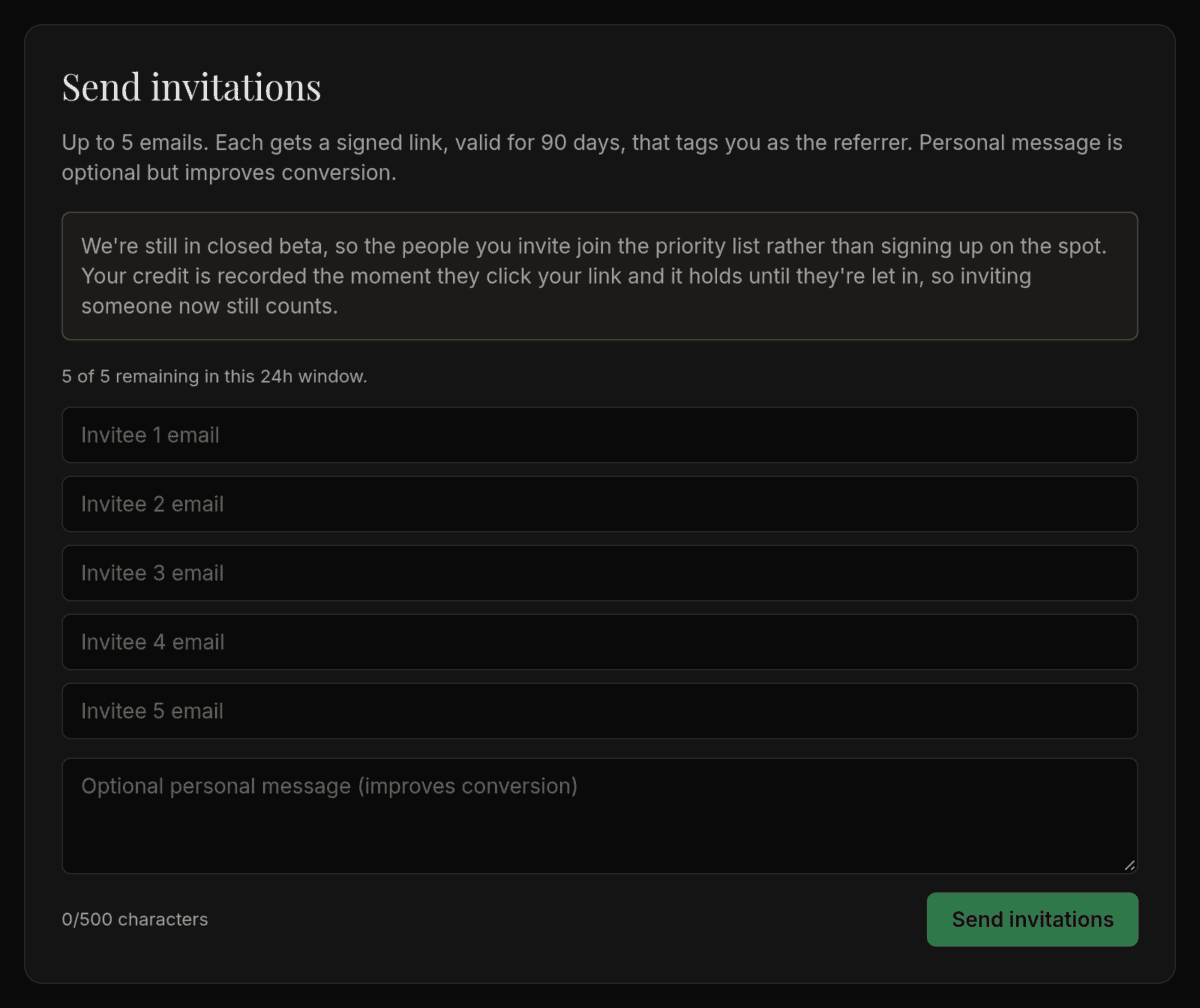
- Email invitations — up to 5 addresses at once, with an optional personal message (it noticeably improves acceptance). Each carries a signed link that credits you as the referrer; a personal invite link is valid for 90 days.
Above the fields, the form counts down what you have left: "[N] of 5 remaining in this 24h window." The "Send invitations" button stays disabled if you fill in more addresses than you have left.
The closed-beta notice. While Profiled is in closed beta, an amber notice sits above the form:
We’re still in closed beta, so the people you invite join the priority list rather than signing up on the spot. Your credit is recorded the moment they click your link and it holds until they’re let in, so inviting someone now still counts.
The personal message. It can be up to 500 characters. Two sentences on why this particular person would want Profiled do more than a bare invitation. An example:
Not another AI résumé builder. It’s built not to flatter you: it will tell a hiring manager, in writing, when you’re wrong for a role. That’s what made me try it. The Free plan is enough to judge it.
The form takes one message per submission. If the people you’re inviting need different messages, send them separately; the daily quota is the same either way.
After you send. Each address gets a result under the form:
| Result | What it means |
|---|---|
| "✓ sent" | The invitation was emailed |
| "already invited" | You already have a live invitation to that address. Nothing was sent and nothing was used from your quota |
| "already has an account" | That person is already on Profiled, so no reward can follow. Nothing was sent, but the address still counts toward your five |
| "opted out" | That address doesn’t accept email from Profiled. The invitation is recorded but wasn’t delivered |
| "send failed" | The email couldn’t be sent. Try again later |
Messages you may see when sending
| Message | What it means |
|---|---|
| "You’ve used your 5 invitations for this 24-hour window. Try again tomorrow." | Shown in place of the counter, with the fields disabled, once the quota is used up |
| "You’ve hit the 24-hour invitation limit. Try again tomorrow." | The submission would take you past five in the rolling 24 hours |
| "Invitations launch in the Pre-Beta rollout. Watch the dashboard for the green-light banner." | Invitations are switched off for everyone for now |
| "Account is still syncing — try again in a few seconds." | Wait a moment and send again |
Your share link
- Your share link — a copyable link for your LinkedIn bio, email signature, or anywhere else. It lasts 90 days, and creating one uses a slot from the same 5-per-day quota as email invites.
This section is hidden during closed beta, on purpose. While sign-ups go through the priority list, a click on a share link is not recorded as your referral, so creating one would use a slot and earn nothing. Email invitations are not affected: their credit is recorded when the invitee clicks.
When closed beta ends, the section returns under the heading "Or share one link", with a "Generate share link" button. Once you have a link, the button is replaced by the link and "Copy link". Asking again gives you the same link and uses nothing from your quota, and you can still copy it after the day’s quota is used up.
Recent invitations
A Recent invitations table tracks each invite: Sent, Accepted, Existing user, Superseded, or Expired.
It lists your 10 most recent invitations, Gift Pro gifts included, in four columns: "Invitee", "Status", "Sent" and "Expires". Addresses are shortened to the first letter and the domain.
| Status | What it means |
|---|---|
| Sent | Recorded and waiting to be accepted. It does not confirm the email was delivered |
| Accepted | For an invitation: they signed up through it and are credited to you, and the half month follows once they publish their profile within 14 days of signing up. For a gift: the recipient created their account and started the trial |
| Existing user | The address already had a Profiled account when you invited it. Nothing was emailed and no reward can follow, but an invitation still used one of your five for the day, and a gift still used one of your gifts for the quarter |
| Superseded | The person signed up through a different invitation. Only the invitation they used is credited |
| Expired | The "Expires" date passed with no sign-up. You can invite the address again, which uses one of your five |
Pending rewards
Above the table, a line explains the first-week wait: your referrals count from day one, and rewards earned in your first week are released on day 7.
The table lists up to 20 rewards that are still in play, in five columns: "Tier", "Months", "Status", "Earned" and "Releases".
| Tier label | What earned it |
|---|---|
| Tier 1 — Free signup | Your invitee published their profile |
| Tier 2 — Pro upgrade | Your invitee upgraded to paid Pro |
| Tier 3 — Retention | Your invitee stayed subscribed to a 3, 6 or 12-month mark |
| Gift bonus | Someone you gave a Gift Pro trial to upgraded |
| Manual grant | Months added by the Profiled team |
"Status" is "Available", "Pending" or "Under review" (the rewards counted in the Held cell). "Releases" shows a date for a Pending reward and a dash for the others. Once that date has passed, the next daily check moves a Pending reward to Available on its own, unless it is withdrawn as described under Pending above.
The footer link on your public profile
Every published profile carries a "Build your own Profiled page" button in its footer. It is a plain link to the Profiled homepage. It carries no referral, and a visitor who signs up after clicking it is not credited to you or to anyone else.
Finishing
- You know the split: half a month when your invitee publishes, 2 more when they upgrade
- You know the two waits: first-week rewards are Held until your account is 7 days old, and an upgrade reward is Pending for 31 days
- You read Available, not Total
- Each invitation went out with a personal message written for that person
- Before claiming, you chose Option A or Option B knowing that Option B carries a smaller voice allowance and no top-ups
- You clicked "Confirm claim" once and waited for "Done"
Related
- How do referral rewards work — what do I earn, and when is it released?
- Why can’t I send referral invitations yet?
- Gift Pro (Pro)
Last verified: 2026-10-10