
What this screen is
Gift Pro lets you give people a taste of Pro: each quarter you can send up to five gifts, and each recipient gets a 14-day Pro trial — no card required on their side.
The screen’s heading reads "Gift Pro trials to people who’d benefit from it." The line under it reads: "As a Pro member, you can gift up to 5 friends a 14-day Pro trial every quarter — no credit card required for the recipient. If one of them later pays for Pro, you earn a gift bonus of 1 month, added to your reward bank after the 31-day refund window." Below sit an allotment card, a "Send gifts" form, a "Recent gifts sent" list, and a "Months earned from gift conversions" figure.
Three facts about the screen:
- Who sees it: Pro only. Gift Pro is the one referral surface that is genuinely Pro-exclusive. The "Gift Pro" menu item appears in the sidebar only while your current plan is Pro. On any other plan the item is not shown at all, and there is no upgrade card in its place.
- If you open it without Pro: On Free, the Gift Pro page redirects to Refer & Earn — which is the free path to earning Pro months for yourself, and available to everyone.
- How you get to it: click "Gift Pro" in the dashboard sidebar, directly under "Refer & Earn". If the item has disappeared, your plan is no longer Pro. Your User Dashboard at a glance: the menu, tiers, flags and banners explains why a menu item can be missing.
Nothing is bought on this screen. A gift is a free trial you hand to someone else, and it costs you nothing but one of your five gifts. For the short version of this page, see What is Gift Pro, and who can send gifts?
Choosing between a gift and a referral invite
A Refer & Earn invitation asks someone to create a free account. A gift hands them two weeks of Pro with no card required, which is a better offer and a better test of whether Profiled suits them.
- Gift Pro — the recipient gets 14 days of Pro when they create their account, and you have five per quarter. Best for people who’d be persuaded by trying voice and the Pro surfaces.
- Refer & Earn invite — no trial attached, and available on every tier. What an invitation earns you is covered in Refer & Earn — the free path to Pro (every tier).
| Gift Pro | Refer & Earn | |
|---|---|---|
| Who can use it | Pro only | Everyone |
| Allowance | 5 gifts per calendar quarter | 5 invitations per rolling 24 hours |
| Unused allowance | Lapses at the end of the quarter | Nothing to lose; the window rolls |
| What the recipient gets | 14 days of Pro, no card | A free account |
| Time to accept | 90 days | 90 days |
| What you earn when they pay for Pro | A gift bonus of 1 month, after the 31-day refund window | 2 months after a 31-day hold, plus retention bonuses |
| Personal message | Optional, up to 500 characters | Optional, up to 500 characters |
They’re not exclusive: a gifted person who converts also credits you.
The two allowances are separate. Gifts do not count toward Refer & Earn’s 5 invitations per rolling 24 hours, and an invitation does not use a gift. Your gifts do appear in the "Recent invitations" table on the Refer & Earn page, alongside your invitations.
Gifts are the scarce one. Five a quarter is twenty a year, so spend them on the few people most likely to stay, and use Refer & Earn for everyone else.
The two clocks
A gift runs on two separate periods. Keep them apart:
- The gift link is valid for 90 days. After that it lapses; you can send a fresh gift in a later quarter. A lapsed gift does not come back to your allotment.
- The trial runs for 14 days from the moment the recipient creates their Profiled account. Someone who accepts on day 89 still gets a full 14 days of Pro.
A recipient accepts by creating an account with the same email address you sent the gift to. An account created with a different address does not receive the trial.
What the trial does for the recipient:
- No card is asked for, so there is nothing to cancel.
- When the 14 days end, the account moves to Free unless the recipient chooses to pay for Pro. What happens when my complimentary or reward Pro ends? describes what changes at that point.
- A recipient who already holds Pro through a longer complimentary period keeps the longer period; the gift does not shorten it.
During the closed beta: a recipient cannot accept on the spot. The button in the gift email reads "Join the priority list", and the email tells them the gift is held for them until they are let in. The trial starts when they create their account, and that still has to happen within 90 days of the day you sent the gift. After that the link has lapsed and the gift is spent. It is worth saying so in your personal message.
The quarterly allotment card
The card at the top shows the quarter label, "N of 5 gifts remaining", the date of the next allotment, and a row of five dots. A filled dot is a gift you still have. A hollow dot is one you have used.
- Allotment: 5 gifts per quarter. The counter on the page shows how many you have left and when the next allotment arrives.
- Unused gifts don’t carry over. A new quarter starts a fresh five; anything unsent from the previous quarter lapses. Plan to use them or lose them — there is no advance warning before the quarter turns.
Quarters are calendar quarters. A new allotment starts on January 1, April 1, July 1 and October 1, at midnight UTC, so the change can fall on the evening before in your local time. You never start a quarter with more than five.
Tip: set your own reminder for the last two weeks of each quarter. Any email about lapsed gifts arrives after the new quarter has begun, when it is too late to send them.
Send gifts
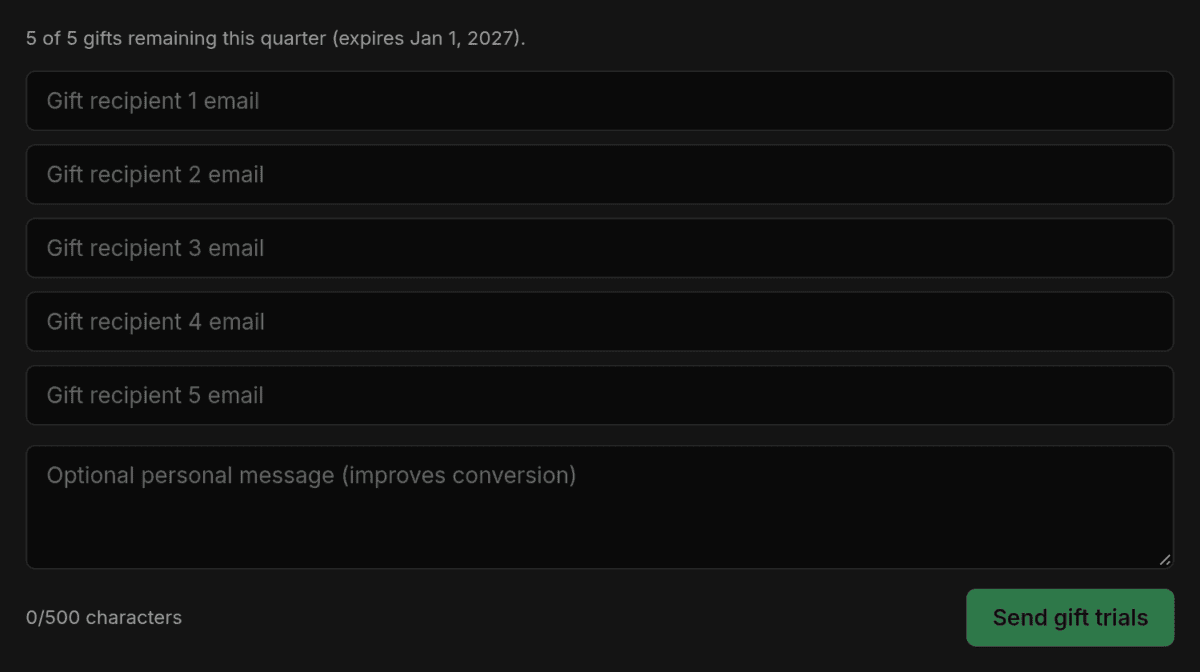
Above the form a line reads "Up to N emails. Each recipient gets a 14-day Pro trial signed to your account — no card required to start." N is the number of gifts you have left.
- Sending: up to 5 email addresses per send, with an optional personal message (up to 500 characters — a personal line noticeably improves the odds the gift is accepted).
- Five fields, always. The form shows five fields labeled "Gift recipient 1 email" to "Gift recipient 5 email" however many gifts you have left. If you fill in more addresses than you have gifts, the "Send gift trials" button stays disabled.
- The same address twice in one send counts once.
- After you send, each address gets its own result line under the form. Addresses that went out are cleared from the form. Any that did not go out stay in their fields so you can correct them and try again.
| Result next to an address | What it means |
|---|---|
| "✓ gift sent" | The gift email went out |
| "already invited" | You already have a live invitation to that address, as a gift or a referral. Nothing was sent and no gift was used |
| "already has an account" | That person is already on Profiled. Nothing was sent, and the gift is still spent |
| "opted out" | That address doesn’t accept email from Profiled. The gift is recorded, but no email reaches them |
| "send failed" | The email couldn’t be sent. No gift was used |
| "quota reached" | You had no gifts left for that address. It was skipped and no gift was used |
What uses a gift
| Situation | Uses a gift |
|---|---|
| The gift email went out | Yes |
| The address already has a Profiled account | Yes. Nothing is emailed, the person cannot accept, and the gift is spent. The form shows "already has an account" and the history shows "already a user" |
| The recipient has opted out of invitation emails from Profiled | Yes. The gift is recorded but no email reaches them |
| The address already has a live invitation from you, as a gift or a referral | No. Nothing is sent |
| The email failed to send | No |
Common mistake: gifting someone who already has a Profiled account. Ask first. A wasted gift costs you a fifth of your quarter.
What the recipient receives
The email’s subject is "Your name sent you 14 days of Profiled Pro". It is signed with the full name on your profile. If your profile has no name yet, the part of your email address before the @ is used instead, so add your name on the Basics tab before you send.
Your personal message appears in the email as "A note from your name:" followed by your text. The email also tells the recipient that the gift link is good for 90 days.
The personal message
The field’s placeholder reads "Optional personal message (improves conversion)", and a counter under it shows how many of the 500 characters you have used.
Write one, and say that it is a gift. An email telling someone they have been given two weeks of a paid product reads very differently from an invitation to sign up, and "no card needed" is the phrase that gets it opened.
For a close colleague in the middle of a search:
I’ve got a few Pro passes to give away and you’re the obvious one. Two weeks of the paid version, no card needed, nothing to cancel. Do the profile properly, especially the private context parts, because that is what changes what hiring managers get told about you. Ping me when you’ve built it and I’ll question your AI and tell you where it’s thin.
For someone who has been job-hunting for a long time:
You’ve been at this for months and the résumé route clearly isn’t working, so try something structurally different. This is two weeks of the full paid version on me. No card, nothing to cancel. The part worth your time is the honest-gaps section. It sounds counterproductive, and it is the reason the rest gets believed.
For a career-changer:
Have two weeks of Pro on me, no card needed. It’s built for exactly your problem: you get to explain the pivot in full instead of hoping someone reads between the lines, and it’s upfront about the gaps. Get the profile published first, then do the Narrative and Gaps sections properly before anything else.
Tip: one message goes to everyone in the send. When different people need different pitches, send them separately. It costs nothing extra, because only the number of gifts counts.
Messages you may see
| Message | What it means |
|---|---|
| "You’ve used all 5 of your gifts for this quarter. New allotment on…" | Shown above the form, with the fields disabled, when your allotment is spent. Wait for the date on the allotment card |
| "You’ve used all your gifts for this quarter. New allotment on…" | The same, if the allotment ran out while you were sending |
| "Enter at least one email address." | The form was sent empty |
| "That doesn’t look like a valid email" | One address is malformed. The message names it. Nothing was sent |
| "You can send up to 5 gifts at once." | Too many addresses in one send |
| "Personal message must be 500 characters or less." | Shorten the message |
| "Gift sends are a Pro perk. Upgrade to Pro to gift trials." | Your plan stopped being Pro while the page was open |
| "Gift sends launch alongside Refer & Earn in the Pre-Beta rollout." | Gift sending is switched off by the Profiled team for now. The fields are disabled |
| "Account is still syncing — try again in a few seconds." | Wait a moment and send again |
Recent gifts sent
This panel lists the gifts you have sent, newest first, up to your 10 most recent. Each row shows the recipient’s address in masked form, the date you sent the gift, once the recipient has created their account the date it was accepted, and a status tag.
| Status | What it means | Your gift |
|---|---|---|
| sent | The gift is recorded and not accepted yet. It does not confirm the email was delivered; the result shown next to the address when you sent it tells you that | Spent, unless that result was "send failed". The recipient has 90 days to accept |
| accepted | The recipient created their account and started the trial | Spent and working |
| already a user | The address already had a Profiled account, so nothing was sent | Spent; an existing account cannot accept a gift |
| superseded | The recipient joined through someone else’s invitation instead | Spent |
| expired | 90 days passed without the recipient creating an account | Spent and unused |
The address is masked even from you: only the first character and the domain are shown, as in "e***@example.com". You typed the addresses, so that is enough to recognize a row, and a screenshot of this screen does not give away your contacts’ email addresses.
Before you have sent anything, the panel reads "No gifts sent yet. Use the form above to send your first one."
Tip: if a row still shows sent after about a week, follow up in person. The gift email may be sitting unread in a promotions folder, and the gift is spent either way.
Months earned from gift conversions
The last panel shows a single figure, "N months", under this line: "When a gift recipient pays for Pro, you earn a gift bonus of 1 month. It is held for 31 days (the refund window), then added to your reward bank."
- What earns it: the recipient accepted your gift and then started a paid Pro subscription on that same account.
- Where it goes: into the same reward bank as Refer & Earn. It shows there as "Gift bonus" and normally waits in Pending for the 31 days, then moves to Available on its own. Like any referral reward, it can be Held for review first, which delays it. Claiming happens on the Refer & Earn page.
- What it replaces: the gift bonus takes the place of the 2-month upgrade reward a referral would earn for that person; you don’t get both. A gift recipient usually earns you no retention bonus.
- What it counts: only months from gift conversions. It reads 0 months until someone you gifted pays for Pro.
How do referral rewards work — what do I earn, and when is it released? covers the reward bank and how months are claimed.
Using your gifts well
- Keep a running list. When someone mentions a frustrating job search, note their name. At the end of the quarter you will have candidates ready.
- Check they do not already have an account. It is the most wasteful mistake available on this screen.
- Gift the people most likely to stay, and refer everyone else.
- Always write the message, and say "no card needed".
- Send separately when the pitches differ.
- Set a quarter-end reminder. Unused gifts lapse.
- Follow up on gifts that have not been accepted.
Finishing
- You know the allotment is five per calendar quarter and does not carry over
- You have a reminder set for the last two weeks of the quarter
- You checked that each recipient does not already have a Profiled account
- Every gift carried a personal message saying it is a gift with no card required
- You sent separately where the pitch differed
- You can tell the two clocks apart: 90 days to accept, then 14 days of trial
- You followed up on any gift still showing sent after a week
- You checked "Months earned from gift conversions" to see whether your gifts are landing
Related
- What is Gift Pro, and who can send gifts?
- Refer & Earn — the free path to Pro (every tier)
- How do referral rewards work — what do I earn, and when is it released?
Last verified: 2026-10-10