
What this screen is
Profile Setup is the panel on your Dashboard that takes a new account to a published profile, one step at a time. Until you publish for the first time it sits between the welcome heading and the "Profile completeness" card, headed "Set up your profile". The sidebar also has a "Profile Setup" entry, second in the list between "Dashboard" and "Profile", that brings you back to it. The entry goes away after your first publish and does not come back if you unpublish.
Every candidate account has the panel, on Free and on Pro. It is a guide, not a form: each step tells you what to do next and links to the screen where you do it.
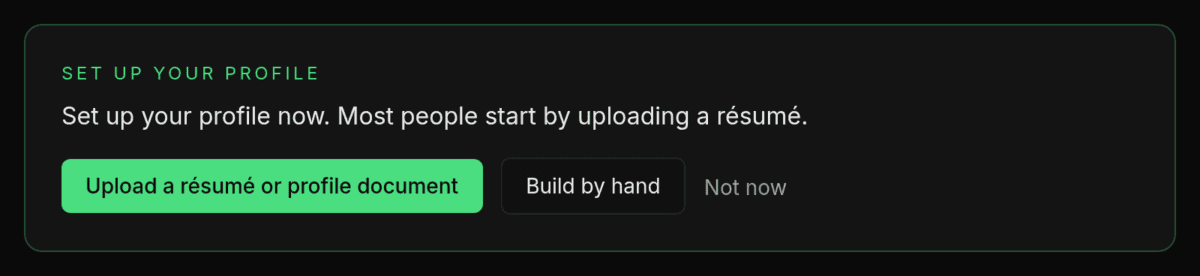
One step at a time
The panel shows only the step you are on. It works the step out from your profile each time the dashboard loads, so when you do something by hand it moves on by itself, and if you remove something it can step back. If more than one step could apply, the panel shows the first one in this table.
| Step | When you see it | What it says | Buttons |
|---|---|---|---|
| A file waiting for review | Your file has been read and its review is still available, waiting for you to apply or discard it (how long a review stays available) | "A file you uploaded is waiting for review." | "Review it" |
| Start | No complete role and no elevator pitch yet | "Set up your profile now. Most people start by uploading a résumé." | "Upload a résumé or profile document" opens the Profile Builder with the upload open. "Build by hand" opens the Profile Builder. "Not now" |
| Publishing requirements | A publishing requirement is still unmet | "Publishing still needs:", then each unmet requirement as a link to its tab, with its own message under it | "Not now" |
| Ready to publish | Every requirement is met and the profile is not published | "Every publishing requirement is met." | "Publish" opens the Profile Builder, where "Publish profile" is. "Add depth first" |
| Add depth | Your profile is published and its depth is under 100% | Your depth percentage, then "The fit assessment gets better with every private answer." | "Add depth" and "Not now" |
| Complete | Your profile depth is 100% | "Your profile is Profiled-worthy." | "See your Journey" |
On a Pro account, the start, publishing-requirements and add-depth steps also show "Talk it out (experimental)", which opens the voice interview. It is not on the one-line bar or on the review, publish and Complete steps, and Free accounts never see it.
Profile depth is a second percentage, separate from the completeness score. It shows how fully the deeper parts of your profile are filled in, and it never decides whether you can publish. Candidates in the closed-beta cohort also see it on the Journey list in Onboarding & Training, as a "Profile depth" line under the milestones, with a "Go →" link to the tab with the most depth still to earn.
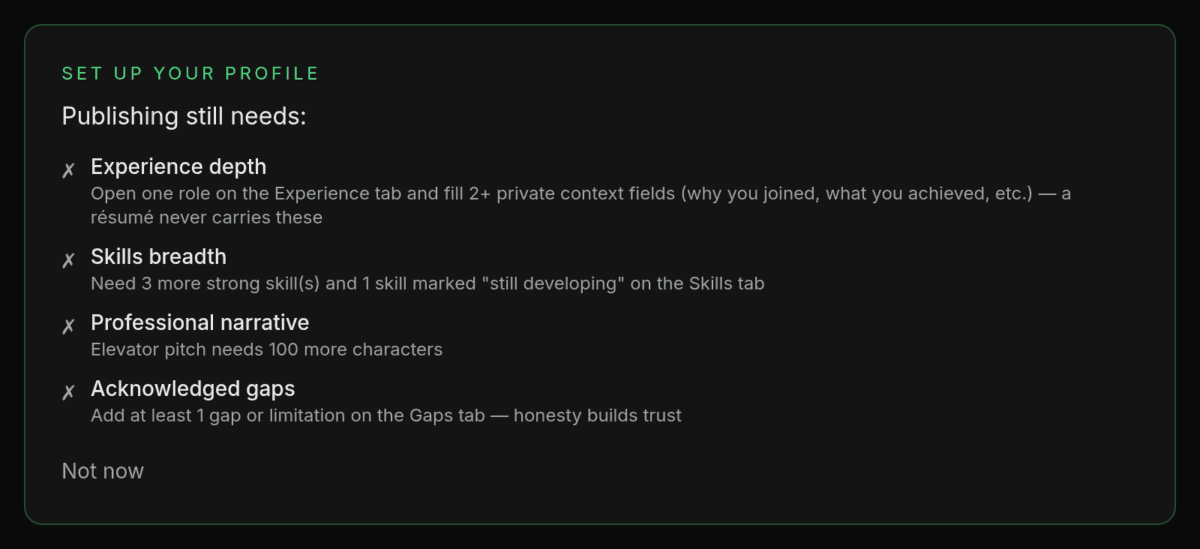
The panel never opens the profile assistant. Its requirement links open the right tab in the Profile Builder. For help with what publishing needs, open "Profile" and use "Fill it with help": see Filling your profile with help: the profile assistant. For the upload and its review, see Importing a résumé or profile document: upload, review, apply.
"Not now" and the bar
"Not now" shrinks the panel to a one-line bar. Before your first publish, the bar reads "Your profile is not set up yet.", with an "Onboarding & Training" link and a "Set up your profile" button that opens the panel again.
The choice is remembered on this browser only. On another browser or device, an unpublished profile shows the open panel again until you choose "Not now" there too. The sidebar’s "Profile Setup" entry takes you to the panel’s place on the dashboard, but it does not reopen a folded panel: use "Set up your profile".

The "Onboarding & Training" link opens the page of guides and support links described in Onboarding & Training.
After your first publish
While your profile is published, the panel’s heading reads "Profile depth". On any browser where you have not opened it, it starts as a one-line bar: "Profile depth" with your percentage and an "Open" button, which brings back the current step: "Add depth" while depth remains, or the Complete step at 100%. "Not now" on the add-depth step shrinks it to the same bar. "Add depth" opens the tab with the most depth still to earn. If a publishing requirement stops being met while your profile is published, the open panel shows the requirements step instead, still headed "Profile depth", with links to the tabs to fix. The sidebar’s "Profile Setup" entry shows only before your first publish.
The completeness card below it
Below the panel, the "Profile completeness" card shows a heading, your score and a progress bar, and nothing else. What to do next is the panel’s job.
The score is not the publishing requirement. To publish you need five requirements met and a score of at least 50, and the panel’s publishing step names any that are missing. Dashboard: completeness, build paths, recruiter messages and banners covers the rest of the Dashboard.
Finishing
- You know which step the panel is on and what it is asking for
- If you are new, you started from the panel with "Upload a résumé or profile document" or "Build by hand"
- You know that "Not now" shrinks the panel on this browser only, and that "Set up your profile" (before publishing) or "Open" (after) brings it back
- You can find the "Profile Setup" entry in the sidebar until your first publish
Related
- Dashboard: completeness, build paths, recruiter messages and banners
- Filling your profile with help: the profile assistant
- Importing a résumé or profile document: upload, review, apply
Last verified: 2026-10-21